


SCHN+
4.5122.00 Reviews
App Specs
- Version
- Varies with Device
- Updated On
- License
- Free
- Downloads
- 10,000+
- Developer
- Space City Home Network
- Categories
- Sports
- Platform
- Android
Screenshots



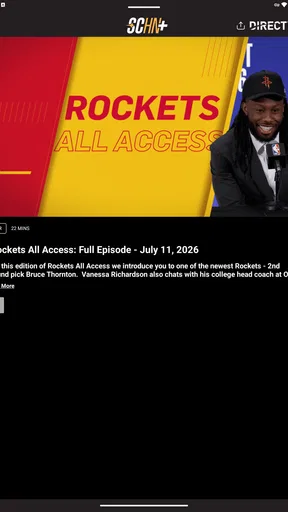
 Analysis by AppCompare
Watching a local team should feel simple: open the right service, find the game, and settle in before the first important play. My experience with SCHN+ is that it is built around that straightforward idea rather than trying to become a general sports hub. It is a free sports app from Space City Home Network, aimed at subscribers who want to stream their favorite local teams in one place.
That focus is both its main strength and its main limitation. If your sports routine revolves around the teams carried by Space City Home Network, this app can be a practical way to keep local coverage close at hand. If you are looking for a broad replacement for every sports service you use, I would not treat it that way. The important question is not whether SCHN+ is a complete sports platform, but whether it fits your local-team viewing routine.
How the local streaming experience feels in everyday use
I found the most convincing use case to be the ordinary one: you are away from your television, a game is about to begin, and you want to follow your local team without searching through unrelated sports content. The app’s purpose is easy to understand, and that clarity matters. Instead of presenting itself as a huge catalog, it centers the experience on streaming local teams for Space City Home Network subscribers.
That makes SCHN+ more useful as a companion to a television setup than as a complete replacement for every way you watch sports. I can imagine opening it during a commute, checking in from another room, or using it when the main television is occupied. Those situations do not require a complicated interface; they require the correct local stream to be easy to reach and comfortable to watch.
The app is listed in the sports category, and its age rating is Everyone, so it is positioned as a broadly accessible viewing tool rather than a specialized product for a narrow technical audience. The developer, Space City Home Network, gives the app a clear connection to the network and its local coverage. That connection is more meaningful here than a long list of generic sports features would be.
One detail I would keep in mind before installing is the relationship between the free download and the subscription requirement. The app itself costs nothing to download, but the viewing experience is intended for Space City Home Network subscribers. In other words, “free” should not be read as unlimited access to every stream without an eligible subscription. That distinction is easy to miss if you only look at the download price.
Why the focused approach works
Many sports apps try to combine scores, news, highlights, league schedules, fantasy tools, and live video. That can be useful, but it can also make the simple task of finding a local broadcast feel buried. SCHN+ has a more direct identity. Its value comes from connecting subscribers with local-team streaming rather than asking them to navigate an oversized sports portal.
Worth Reading Before You Choose

Baby Panda World Brings Quick Play to Modern Phones, but Its Game Library Feels Busy

ESPN’s Live Game View Makes Following Close Games Easier

QuizzLand Review: A Good Fit for Short Trivia Breaks, Not Every Player

Basketball Stars: Multiplayer Is Fast, but Can It Recover When Matches Go Wrong?

WEBTOON Turns Phone Updates Into a Better Reading Routine

Link to Windows Runs on Shared Habits, Not Social Feeds
For me, that focus creates a calmer workflow. I would use a broad sports app when I want to follow several leagues or compare scores across the country. I would use SCHN+ when my priority is a Space City Home Network game and I want the network’s own streaming destination. The two types of service can complement each other instead of competing for exactly the same job.
There is also a practical advantage to keeping the app installed even when I normally watch on a larger screen. A phone or tablet can act as a backup viewing option when plans change. If a television is being used for something else, or if I am visiting someone who does not have my usual setup, a dedicated local-team app is more convenient than trying to reconstruct the broadcast through unrelated services.
That convenience depends on being part of the intended subscriber audience. Someone who only wants occasional sports clips may find the app less compelling than a general sports news service. The strongest value appears when live local coverage is already part of your regular viewing habits.
Subscription expectations and the cost question
Although the app is free to install, its listed in-app purchase range runs from $19.99 to $199.99 per item. Those figures make it especially important to understand what access arrangement suits your household before committing. I would not install it assuming that the download alone settles the cost of watching. The subscription side is part of the decision.
This is where SCHN+ differs from a simple free score tracker. A score app can tell you what happened without asking you to arrange viewing access. SCHN+ is intended for people who want the stream itself, so the financial decision is tied to how often you watch local teams. If you follow them throughout a season, a dedicated subscription may feel more reasonable than repeatedly piecing together access through separate options. If you only watch a few games, the value requires more careful thought.
I would also make the subscription check before game day rather than during it. Confirm that your Space City Home Network access is active, sign in ahead of time, and make sure the device you plan to use is ready. That is a small but useful habit with any live sports service, and it matters more when the app’s usefulness is concentrated around events that start at a fixed time.
Another sensible workflow is to decide which device is your primary screen and which is your backup. A larger display is naturally better for a full game, while a phone is more convenient when moving around. SCHN+ makes the most sense when you treat it as part of that flexible setup, not as a reason to abandon every other way of watching.
Where it stands beside familiar sports alternatives
Compared with a general sports app, SCHN+ is narrower but potentially more relevant to a local fan. General services are usually better for league-wide awareness, national matchups, scores, standings, and broad news. They may be the better choice if your interests change from one sport or team to another every week.
Compared with a television package, SCHN+ appears more convenient for mobile access and more specifically tied to Space City Home Network’s local coverage. A traditional television setup may still be preferable for people who want one remote, one large screen, and no interest in watching on a phone or tablet. The app does not automatically make that living-room routine obsolete; it adds another route to the same local-team habit.
Compared with unofficial streams or scattered online sources, a dedicated network app is the more sensible option for a subscriber who wants a direct and recognizable place to watch. I would rather begin with the service connected to the local network than spend time searching through questionable alternatives. The trade-off is that the official route is tied to the applicable subscription arrangement, while random sources may appear more immediately accessible but are far less dependable as a viewing routine.
The comparison also explains why I would avoid judging SCHN+ by the standards of a massive national streaming platform. Its success should be measured by how quickly it helps the right subscriber reach local coverage. On that narrower test, the app has a coherent reason to exist.
The friction I would not ignore
The biggest weakness is the limited audience. SCHN+ is not an all-purpose answer for someone who wants every favorite team in one application. If your household follows teams outside the Space City Home Network focus, you will still need other services or apps. That can mean switching between platforms, remembering different access arrangements, and deciding which screen should handle which game.
The subscription requirement is another point of friction. A free installation can create the impression that the service is immediately open to everyone, but the app’s stated purpose is for subscribers. New users should think of the download as the doorway to the service, not as the entire service. That is not unusual for live sports, but it affects how attractive the app feels to casual viewers.
There is also a difference between wanting live local coverage and wanting a complete archive of sports information. If your first question after opening an app is usually “What happened across every league today?” SCHN+ may feel too specialized. I would pair it with a broader score or news app rather than expecting it to handle that wider job.
The available audience response is encouraging but still relatively modest in scale: the app carries a 4.5 average from 358 ratings and 122 reviews. I read that as a positive signal that the core idea is working for many users, while remembering that a smaller review pool does not reveal every possible device or household experience. The rating supports trying it if you are already in the intended audience, but it should not replace checking whether the subscription fits your needs.
The release date, October 18, 2025, also places the app in a relatively new stage of its life. That can be appealing if you want a current network-focused service, but it means I would keep expectations practical. A newer app may still be refining the details that become important over long viewing sessions, such as account flow, device consistency, and how smoothly it handles the moments around a live event. I would test it before relying on it for the most important game of the season.
Who should install it, and who should skip it
I would recommend SCHN+ first to Space City Home Network subscribers who regularly follow the local teams covered through the service. It is particularly suitable for people who want a mobile viewing option, need a backup to their main television, or prefer a network-specific destination over a crowded sports application.
It is also a good fit for households where different people watch in different places. One person may be using the main television, while another wants to follow the game elsewhere. A dedicated app can make that arrangement less awkward, provided the household’s subscription and device access support the intended use.
I would be more cautious if you are a very occasional viewer. Someone who watches only when a major matchup catches their attention may not get enough value from a service centered on local-team streaming. In that situation, a general sports app for scores and news, combined with whatever viewing option is already available, may be simpler.
I would also skip it as a primary solution if your sports interests are broad and constantly changing. Fans who follow multiple regions, leagues, and national broadcasts will probably prefer a wider platform. SCHN+ can still have a place for local games, but it will not remove the need for those other services.
For families, the Everyone rating makes the app broadly approachable, but the practical question is still access rather than age. I would make sure the person using it understands which account or subscription is connected to the stream. That prevents the common disappointment of downloading a free app and discovering at the start of a game that the viewing access belongs to a different account.
Small habits that make the app more useful
My first tip is to treat it as a planned game-day tool rather than an app you install only after the opening whistle. Open it in advance, check the account connection, and choose your viewing location before the event begins. This workflow is more valuable than any decorative feature because live sports leave little room for troubleshooting once the action starts.
My second tip is to use it as a deliberate second-screen option. Instead of casually duplicating the same game on every device, decide whether the phone is your main screen, a backup, or a way to keep the game nearby while doing something else. That helps you judge whether the service is genuinely adding flexibility or merely creating another place to manage.
My third tip is to evaluate the subscription against your actual calendar. If you know you will follow local games regularly, the dedicated service may fit naturally into your routine. If your interest is limited to a handful of dates, compare that expected use with the available purchase options before paying. The listed range from $19.99 to $199.99 per item is wide enough that the right choice depends heavily on your viewing pattern.
Finally, keep a broader sports source beside it if you care about results outside the local coverage. That is not a criticism of the app so much as a realistic division of labor. Let SCHN+ handle the local stream, and let another service handle national scores, wider league news, or teams outside its focus. Using each tool for the job it actually does well produces a better experience than demanding that one app cover everything.
My verdict for local-team viewers
After looking at the app as a daily sports tool rather than just a free download, I see SCHN+ as a focused service with a clear audience. Its strongest evidence is the direct connection between Space City Home Network subscribers and local-team streaming. That makes it more purposeful than a generic sports app when the game you care about belongs to that local viewing routine.
Its weaknesses are equally clear: the subscription requirement affects the real cost, the audience is narrower than that of a national sports platform, and the app should not be mistaken for a universal home for every team or league. Those limits are important, but they do not undermine the central idea. They simply define who will benefit.
The app is free to download, carries an Everyone rating, and has attracted over 10K installs, with a 4.5 average from its current ratings. I would take those signs as a reasonable invitation to try it if you are already a Space City Home Network subscriber. I would not install it expecting a complete sports ecosystem.
My recommendation is straightforward: if local games are the reason you opened this review, SCHN+ is worth considering as a dedicated streaming companion. If your priority is broad sports discovery, nationwide coverage, or the lowest possible commitment for occasional viewing, choose a more general alternative instead. For the right subscriber, its narrow focus is the feature; for everyone else, that same focus is the reason to look elsewhere.
Pros
- Simple interface makes browsing content quick and easy.
- Supports convenient access to SCHN+ content on mobile devices.
- Video playback is generally smooth on a stable internet connection.
- Useful for keeping up with selected shows and entertainment content.
- The app is lightweight and does not require extensive device storage.
Cons
- Some content may require a paid subscription to access.
- Offline viewing options may be limited or unavailable.
- Streaming quality depends heavily on your internet connection.
- The catalog may feel narrow compared with larger streaming services.
- Occasional loading delays can occur when navigating or starting videos.
FAQs for SCHN+
What is SCHN+ and what can I watch on it?
SCHN+ is a streaming platform focused on providing access to SCHN programming and related entertainment content through compatible mobile devices. Depending on your location and the current catalog, you may find live channels, on-demand shows, sports, news, documentaries, or special programming. Content availability can change, so it is worth checking the in-app catalog before subscribing or downloading.
Is SCHN+ free to download and use?
The SCHN+ application may be free to download, but access to all of its content can depend on the subscription plan, account type, or service provider associated with your region. Some features may be available without payment, while premium programs or live content may require a subscription or login. Always review the pricing and trial conditions shown in the official app listing.
Does SCHN+ work on Android and iPhone?
SCHN+ is designed for mobile access and may be available on supported Android and iOS devices. Before installing, check the official Google Play Store or App Store listing for the required operating-system version, device compatibility, and regional availability. Older phones or tablets may not support every feature, and performance can vary depending on hardware and software updates.
Do I need an internet connection to use SCHN+?
Yes, SCHN+ generally requires an active internet connection to stream video or access live programming. Wi-Fi is recommended for longer viewing sessions because mobile streaming can consume a significant amount of data. If the app offers downloads for offline viewing, availability may depend on the title, subscription, device, and regional restrictions. Streaming quality may also adjust automatically when the connection is weak.
Are parental controls and account features available in SCHN+?
Account and parental-control options can vary according to the version of SCHN+ and the service available in your country. Families should review the profile, content-rating, and playback settings after signing in, rather than assuming that every program is suitable for children. It is also advisable to protect the account with a strong password and review any recurring subscription settings before completing registration.


